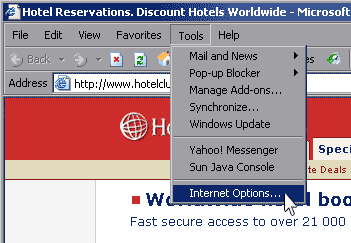
Enable Javascript by going to Tools > Internet
Options or use a shortcut by pressing:
ALT-T then O


Javascript needs to be turned-on in your browser to fully experience HotelClub site's features. Please follow the simple steps below for you Internet Explorer browser. If using a different browser, please see our Mozilla Firefox guide.
Enable Javascript by going to Tools > Internet
Options or use a shortcut by pressing:
ALT-T then O
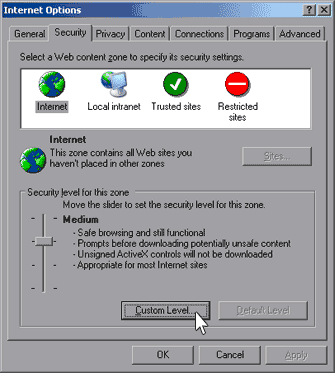
The Internet Options window will pop up and present you some options to set your browser preferences.
Click on the Security tab. Check to see that you are on the "Internet web content zone" (globe icon) and click on the "Custom Level" button.
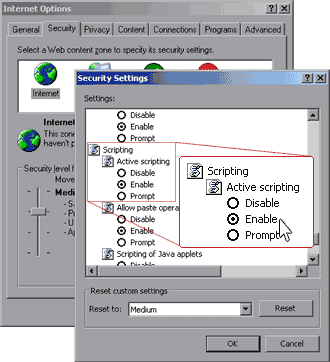
The Security Settings window will pop-up. Scroll down to find Scripting > Active scripting section and tick the "Enable" radio button.
Click on OK to close the dialog box and click Apply and the OK button at the Internet Options window to save your settings.
 · Privacy Policy · Terms Of Use · Feedback · Hotel/Suppliers ·
